
Keep your editor, plugins, themes, and workspace; purchase DeepAsk separately only when you need AI.
Obsidian vs Aino
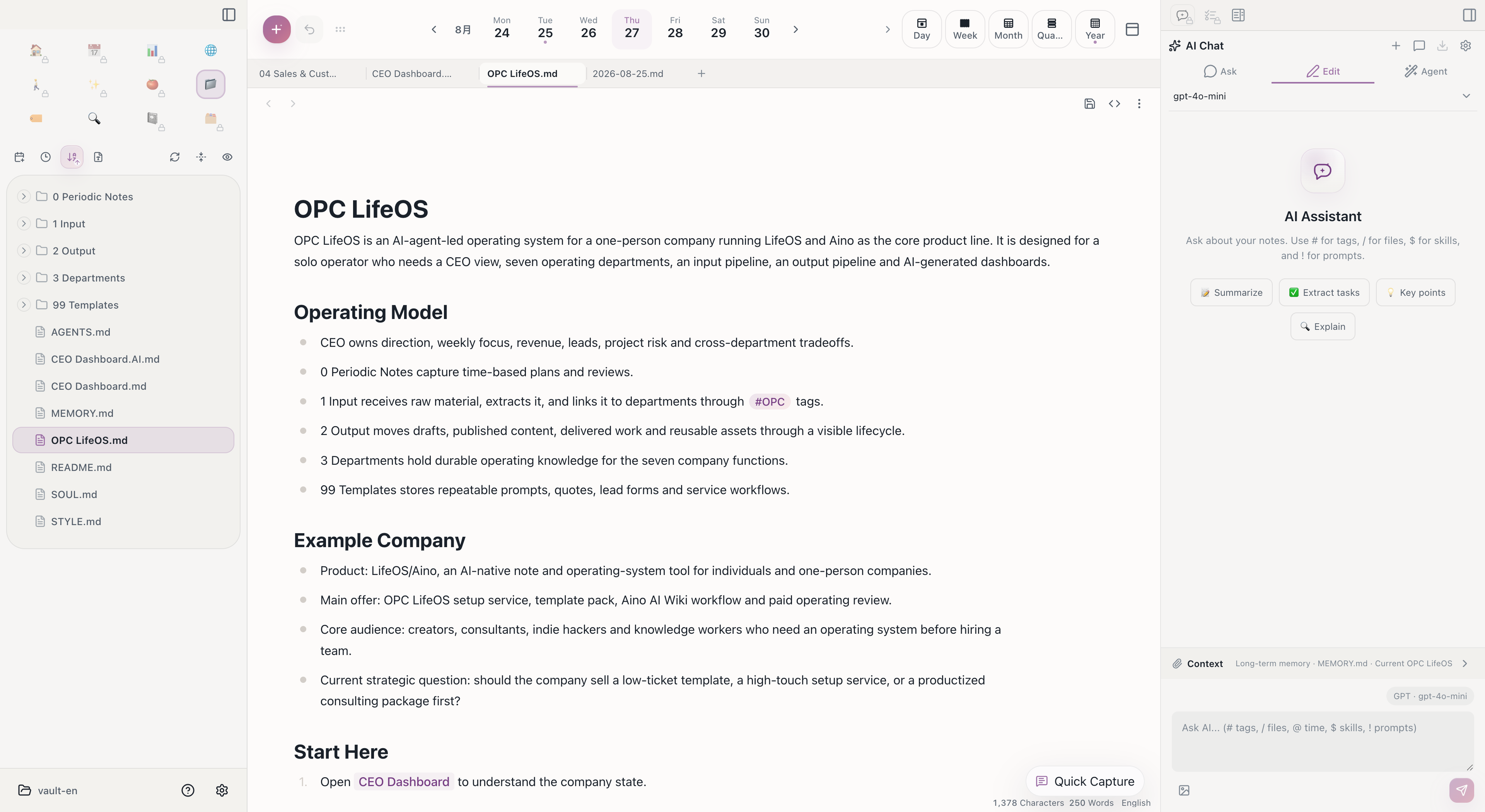
Obsidian LifeOS Pro and Aino LifeOS are not replacements for each other. They are two Markdown Workspaces for the same kind of note assets: one runs inside the Obsidian plugin ecosystem, and the other is a standalone AI-native desktop app.
What matters most is not which app opens your notes today. What matters is that your notes remain Markdown files, folders, tags, and links that you can migrate, back up, and open with different tools.
Choose by working style before comparing every feature
Both use local Markdown and can open the same vault. Your core notes remain portable if you change tools later.
Capabilities and Boundaries
See the complete 10-part capability and boundary comparison
Four things to remember
- The same Markdown data
- LifeOS workflows align where practical
- Host capabilities still differ
- Purchases and licenses are separate
| Dimension | Shared foundation | Obsidian + LifeOS | Aino Desktop |
|---|---|---|---|
| Product form | Both support the same LifeOS workflows | A plugin suite running inside Obsidian | A standalone app with its own desktop runtime |
| Note data | Local Markdown, folders, tags, wikilinks, tasks, and frontmatter | Native Obsidian vault | Opens Markdown or Obsidian vaults directly |
| LifeOS views | Business logic and most product views are shared where practical | Adapted to Obsidian themes, sidebars, and workspaces | Desktop design baseline for shared views |
| Editor and files | Reads and writes the same Markdown files | Uses the Obsidian editor and file explorer | Uses Aino’s built-in editor, library, and file tree |
| Extensions | The core file format does not depend on a proprietary database | Obsidian community plugins, themes, CSS, and hotkeys | Built-in workflows, LifeOS Skill, MCP, and app integrations |
| AI chat | Shares the chat workflow and UI building blocks; both require a model provider | Requires a separately purchased and activated DeepAsk license | Built into the Aino Desktop sidebar |
| Local agents / Node.js | Desktop can connect to local models or agents | Provided by DeepAsk on desktop; Obsidian Mobile cannot run Node.js or CLI agents | Integrated through the standalone desktop runtime |
| Mobile | Core Markdown data can move through the sync method you choose | Some plugin features work in Obsidian Mobile, subject to mobile API limits | Aino Desktop does not run on phones; Aino Mobile is a separate product |
| Sync | The vault remains a normal folder you control | Uses Obsidian Sync, iCloud, Git, or another user-managed option | Can use Aino-supported WebDAV, S3, and related sync options |
| Purchase and licensing | Data compatibility does not make licenses interchangeable | LifeOS Pro, Calendar Pro, and DeepAsk are licensed separately | Aino Desktop Pro is separate and does not include Aino Mobile Pro |
Choose Obsidian + LifeOS Pro
If you already have a stable Obsidian workflow and rely on community plugins, themes, custom CSS, hotkeys, and local scripts, staying with Obsidian + LifeOS Pro makes sense.
LifeOS Pro will continue to be maintained and improved. It is for users who want the LifeOS methodology inside Obsidian: periodic notes, theme notes, tasks, calendar, and advanced lists, while keeping the Obsidian ecosystem.
Choose Aino Desktop
If you want the knowledge base, tasks, calendar, AI sidebar, and example templates to be available as soon as the app opens, and you want AI to work with the current note, tags, files, and template context, Aino Desktop is the better fit.
Aino is not trying to invent a private note format. It provides a more integrated view layer and AI workspace on top of Markdown. It respects Obsidian Flavored Markdown as much as possible, including tags, wikilinks, tasks, embeds, callouts, and frontmatter.
They Can Coexist
Aino can directly open an Obsidian Vault. You can use Obsidian as a highly extensible editor, and use Aino as an AI-native workspace for operations, review, and execution.
Why Do They Look Similar but Not Identical?
The two product lines share the LifeOS business core, data structures, and most product views where practical. Aino Desktop is the design baseline for shared views. Host-specific surfaces still require adapters: Obsidian supplies its editor, file explorer, workspace, theme variables, and plugin APIs, while Aino supplies a standalone desktop runtime, built-in file tree, and AI sidebar.
“Shared” therefore means that equivalent workflows should keep equivalent interactions and results. It does not mean embedding the entire Aino window inside Obsidian. File opening, browser integration, sidebars, mobile support, and local processes follow the limits of each host.
Data Commitment
Aino's principle is simple: no private syntax lock-in, and no note format that only Aino can read. Your core assets remain local Markdown folders.
This means you can:
- Continue opening the same Vault in Obsidian.
- Back up the folder with Git, iCloud, Dropbox, Syncthing, or other tools.
- Move to another Markdown tool when needed.
- Use Aino for the integrated AI sidebar, tasks, calendar, and built-in templates.
Continue Reading
- Obsidian Flavored Markdown Compatibility — See which Obsidian Markdown features Aino supports.
- Migration, Coexistence, and Choice — Learn how to open an existing Vault.
- Obsidian vs Aino — Read the Obsidian LifeOS Pro perspective.
Start with Aino
Turn this approach into your everyday workflow
Try Aino Desktop Pro free for 7 days, open an existing Markdown vault, or start with the complete example vault from your email.
- 7-day free trial
- Portable Markdown
- Complete example vault by email